
Integrated Image Editor: Fix AI-Generated Assets in Seconds
Discover the new integrated image editor in RPGJS Studio that lets you quickly fix common issues with AI-generated sprites: misaligned frames, incorrect scaling, transparency issues, and wrong orientations.
Integrated Image Editor: Fix AI-Generated Assets in Seconds
AI-powered sprite generation has revolutionized game asset creation, allowing developers to generate characters, monsters, and objects with just a few prompts. However, even the most advanced AI models can produce results that need fine-tuning. That’s why we’ve integrated a powerful image editor directly into RPGJS Studio—so you can fix common issues without leaving your workflow.
The Challenge with AI-Generated Assets
When working with AI-generated sprites, you might encounter several common issues:
- Misaligned frames: A character frame might not be properly centered within its cell
- Incorrect scaling: Some frames could be too large or too small compared to others
- Transparency problems: A few stray pixels might not be transparent when they should be
- Wrong orientation: A character frame might face the wrong direction (left instead of right, for example)
- Inconsistent positioning: Frames from the same sprite might not align perfectly
These small imperfections can add up, making your game assets look unprofessional or causing gameplay issues. Previously, fixing these problems meant exporting your sprites, opening them in an external image editor, making corrections, and re-importing—a time-consuming process that breaks your creative flow.
The Solution: Built-In Image Editing
Our integrated image editor eliminates this workflow interruption. You can now fix these issues directly within RPGJS Studio, without ever leaving the editor. This seamless experience keeps you focused on creating your game rather than managing files and switching between applications.
Quick Fixes at Your Fingertips
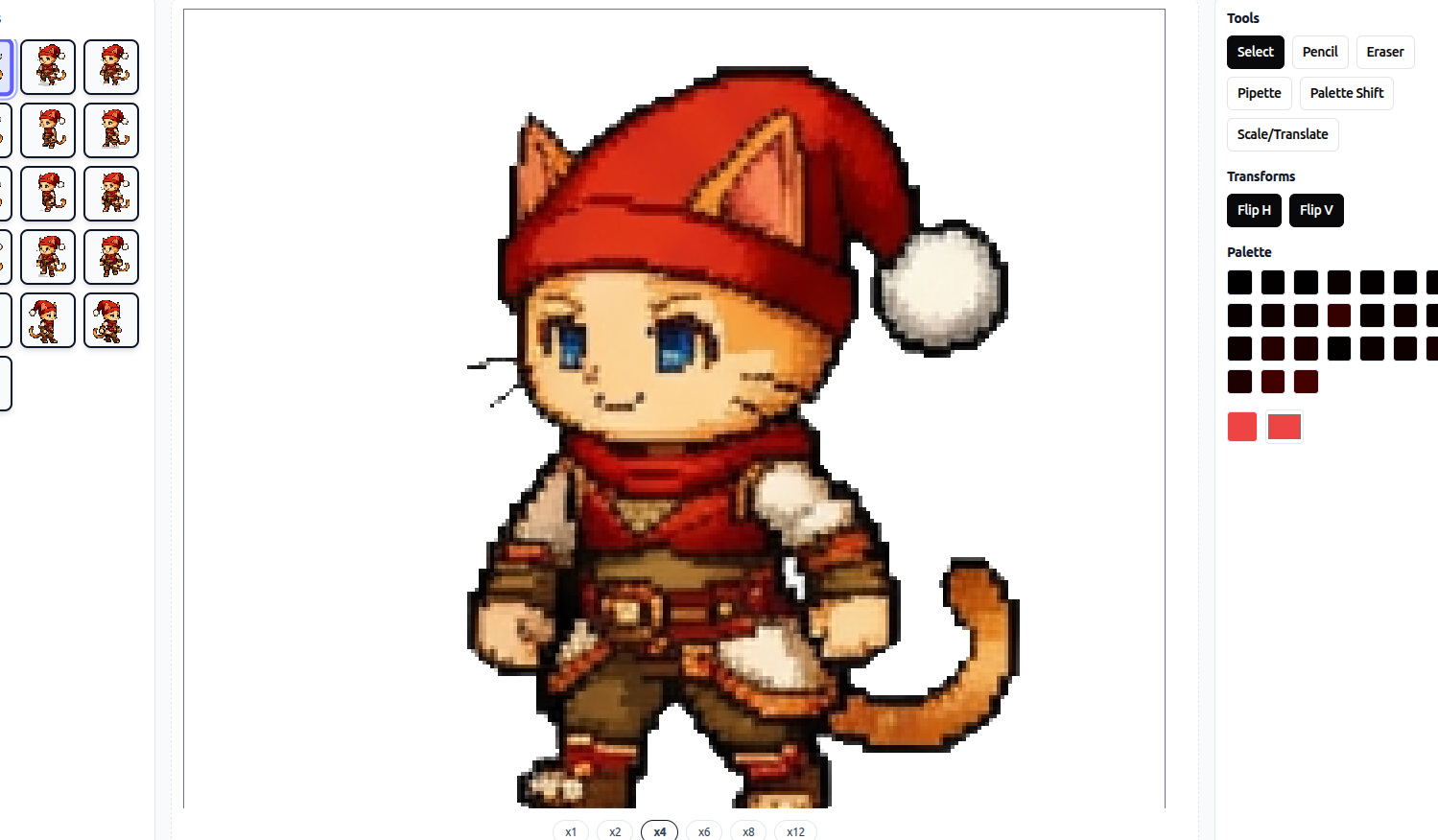
The integrated editor provides essential tools for the most common corrections:
1. Frame Flipping
Need to flip a character frame horizontally or vertically? With a single click, you can reverse any frame’s orientation. This is especially useful when:
- A character is facing the wrong direction
- You want to create mirror animations
- You need to adjust sprite symmetry
2. Scaling and Resizing
Perfect for correcting frames that are too large or too small. The scaling tool lets you:
- Resize individual frames to match the rest of your sprite
- Maintain aspect ratio or adjust proportions as needed
- Ensure consistent sizing across all frames
3. Repositioning
Centering and alignment issues? The repositioning tool allows you to:
- Move frames within their cells for perfect alignment
- Ensure consistent positioning across all frames
- Fix misaligned sprites quickly
4. Pixel Eraser
Remove unwanted pixels with precision. The eraser tool helps you:
- Clean up transparency issues
- Remove stray pixels that shouldn’t be visible
- Fine-tune sprite edges for cleaner results
How to Use the Image Editor
Using the integrated editor is straightforward:
- Select your sprite: Open any AI-generated sprite in the editor
- Choose the frame: Click on the specific frame that needs correction
- Pick your tool: Select from flip, scale, reposition, or eraser
- Make your adjustments: Apply the changes with intuitive controls
- Save and continue: Your changes are saved automatically—no export/import needed
The entire process takes seconds, not minutes. What used to be a multi-step workflow is now a seamless part of your asset creation process.
Future Enhancements: AI-Powered Editing Tools
While the current editor handles the most common corrections, we’re planning to expand its capabilities with AI-powered editing tools. These advanced features will enable:
- Automatic frame alignment: AI will detect and correct misaligned frames automatically
- Smart transparency cleanup: Intelligent algorithms will remove unwanted pixels while preserving important details
- Consistent scaling: AI will analyze your sprite and ensure all frames are properly scaled
- Style consistency: Advanced tools to maintain visual coherence across all frames
- Batch corrections: Apply fixes to multiple frames simultaneously with AI assistance
These upcoming features will make the editing process even faster and more intuitive, leveraging AI not just for generation, but for refinement and optimization as well.
Why This Matters
The integrated image editor represents more than just a convenience feature—it’s a fundamental improvement to the game development workflow. By eliminating the need to switch between applications, you can:
- Maintain creative flow: Stay in the zone without context switching
- Iterate faster: Make quick corrections and see results immediately
- Reduce errors: No risk of losing work during export/import cycles
- Save time: Fix issues in seconds instead of minutes
For game developers working with AI-generated assets, this editor bridges the gap between AI generation and production-ready sprites, ensuring that every asset in your game meets your quality standards.