
Map Transitions: Building Connected Worlds in RPGJS
We're thrilled to announce the long-awaited map transition feature in RPGJS! This fundamental addition allows you to create complete games with multiple connected maps, opening up endless possibilities for world-building and storytelling.
Map Transitions: Building Connected Worlds in RPGJS
We’re thrilled to announce the long-awaited map transition feature in RPGJS! This fundamental addition allows you to create complete games with multiple connected maps, opening up endless possibilities for world-building and storytelling.
Until now, creators could only test individual maps in isolation. This new feature is a game-changer—literally. It enables you to build entire worlds, create complex scenarios, and develop complete game experiences rather than just testing single maps.
Two Ways to Navigate Between Maps
RPGJS now offers two flexible methods for moving between maps, each designed for different use cases.
Method 1: Adjacent Maps with the World Grid
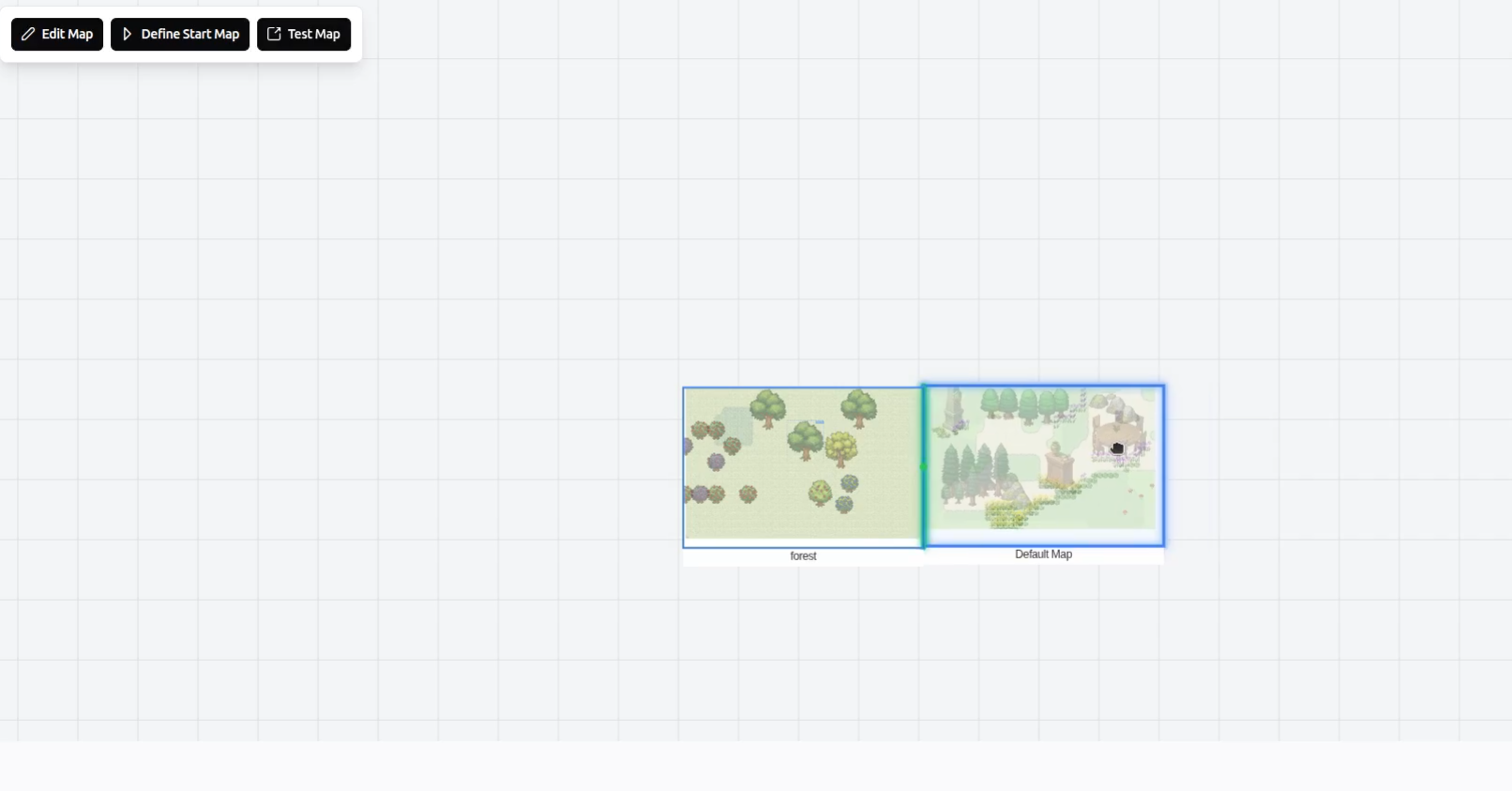
The first method uses what we call the World Grid. This powerful feature allows you to visualize all your maps in a grid layout and connect them together to create a seamless world with adjacent maps.
How It Works
Connecting maps is incredibly simple:
- Drag and drop one map next to another map in the World Grid
- The connection is automatically saved—no manual configuration needed
- Your character can now seamlessly walk from one map to the adjacent one
This creates a natural, open-world feel where players can explore connected areas without interruption.
Setting Starting Points
Each map offers two types of starting points:
- Test Starting Point: Define a starting position for testing individual maps in isolation
- Game Starting Point: Set the initial spawn location for your entire game
When you run Test Game, the game will start at the designated game starting point, allowing you to play through your complete world from the beginning.
Method 2: Event-Based Transitions with Transfer Player Block
The second method uses events, giving you more control over when and how players move between maps.
The Transfer Player Block
We’ve added a new Transfer Player block to the event system. This block allows you to:
- Choose any map as the destination (including the current map for teleportation)
- Trigger transitions based on specific game events or conditions
- Create teleportation points, portals, or doorways
Use Cases for Event-Based Transitions
This method is perfect for:
- Non-adjacent locations: Teleport players to maps that aren’t physically connected
- Same-map teleportation: Move players to different locations within the same map
- Conditional transitions: Create doors that only open with keys, or portals that activate under specific conditions
- Story-driven movement: Control player movement based on narrative events
Why This Matters
These improvements represent a fundamental shift in what’s possible with RPGJS. Before this feature, creators were limited to single-map experiences. Now, you can:
- Build complete worlds with multiple interconnected areas
- Create complex scenarios with branching paths and multiple locations
- Develop full games rather than isolated map tests
- Design open-world experiences with seamless exploration
- Implement story-driven navigation with event-controlled transitions
Getting Started
To start connecting your maps:
- Open the World Grid view in your project
- Drag your maps into position to create adjacent connections
- Set your game’s starting point on the initial map
- Use Transfer Player blocks in events for teleportation and non-adjacent transitions
The feature is intuitive and designed to work seamlessly with your existing maps and events. No complex configuration required—just drag, drop, and play!
Conclusion
Map transitions have been one of the most requested features, and we’re excited to see what you’ll create with this new capability. Whether you’re building a sprawling open world or a carefully crafted linear adventure, these tools give you the flexibility to bring your vision to life.
Start connecting your maps today and take your RPGJS projects to the next level!